
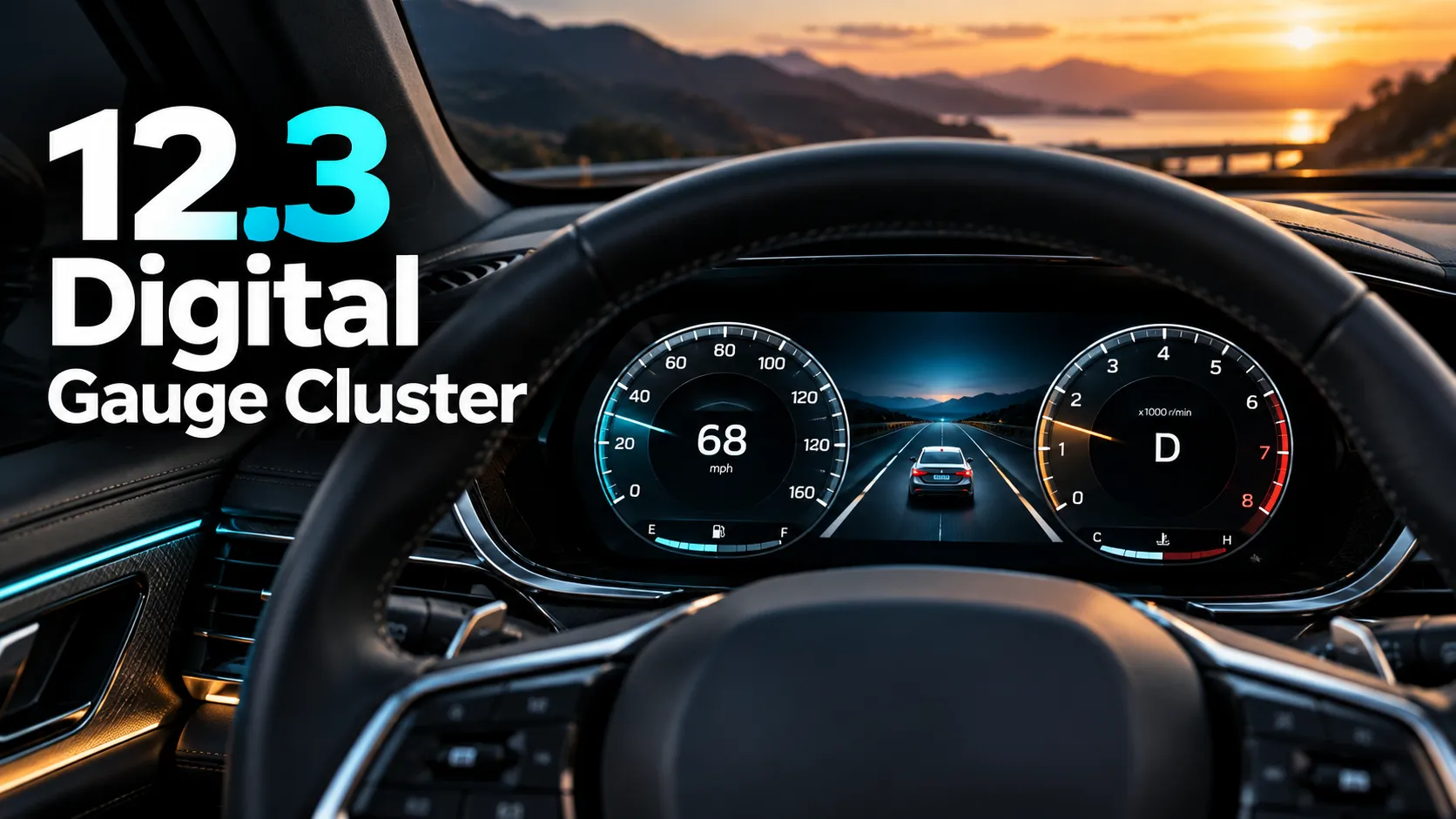
A 12.3 digital gauge cluster is a full-width electronic driver display that replaces traditional analog gauges with a 12.3-inch screen. It shows speed, RPM, fuel, warnings, navigation prompts, and other driving data in a more modern, customizable layout.
If you’ve seen a car listed with a “12.3 digital gauge cluster,” it usually means the driver gets a large screen behind the steering wheel instead of separate speedometer and tachometer needles. I’m going to break down what that means, how it works, where you’ll see it, and what to watch for before you buy.
These displays are common in newer vehicles, especially higher trims, and they can make the cabin feel more advanced. But like any vehicle feature, they have tradeoffs that matter in daily driving.
What Is a 12.3 Digital Gauge Cluster in a Car?
A 12.3 digital gauge cluster is a driver information screen that sits directly in front of the steering wheel. Instead of mechanical needles and printed dials, it uses a high-resolution display to show the information a driver needs most.
How a 12.3-inch digital instrument cluster differs from analog gauges
Analog gauges use physical needles and fixed markings. A digital cluster uses software, so it can change the layout, colors, and information shown on screen.
That means one car can show a classic round-gauge look, while another can display a wide map, simplified readouts, or a performance-style layout. The hardware is still a screen, but the presentation can feel very different from one vehicle to another.
What the “12.3” measurement actually refers to
The “12.3” usually refers to the screen’s diagonal measurement in inches. It does not mean the display is 12.3 inches wide or tall; it means the distance from one corner to the opposite corner is 12.3 inches.
That size gives automakers enough room to show more than just speed and fuel. It can also handle driver-assist alerts, turn-by-turn directions, and vehicle status info without feeling cramped.
Where you’ll typically find a 12.3 digital gauge cluster in modern vehicles
You’ll often find this feature in midsize and full-size SUVs, luxury sedans, premium trucks, and performance models. It’s also becoming more common in upper trims of mainstream vehicles.
For example, many automakers use large digital clusters as part of a tech package or higher trim level. If you want to see how manufacturers describe digital displays in their own terms, brands like Toyota and Ford often list instrument cluster details in vehicle specs and trim breakdowns.
Some digital clusters can change their appearance based on drive mode, so the same screen may look calm in Eco mode and more aggressive in Sport mode.
How a 12.3 Digital Gauge Cluster Displays Driving Information
A digital cluster is more than a fancy screen. It is tied into the vehicle’s electronics, sensors, and software so it can show real-time driving data.
Speed, RPM, fuel, and temperature readouts
At the core, the cluster still handles the basics. You’ll see speed, engine RPM, fuel level, coolant temperature, and warning lights.
Some displays keep these items in a familiar layout. Others shrink them and put the focus on a center information panel or a full-screen map.
Driver-assist alerts, navigation prompts, and warning icons
Many 12.3-inch clusters can show lane-keeping alerts, blind-spot warnings, adaptive cruise control status, and collision warnings. If the vehicle has built-in navigation, turn-by-turn prompts can appear right in front of the driver.
This can help reduce the need to look down at the center touchscreen. It keeps key information in the driver’s line of sight, which is one reason many buyers like the feature.
Customizable layouts and display modes
One of the biggest advantages of a digital cluster is customization. Drivers can often choose between simple, standard, and advanced layouts.
Some vehicles let you move information around the screen or choose what stays visible at all times. Performance models may include a tach-heavy layout, while family SUVs may prioritize navigation and safety data.
Day/night brightness and visibility features
Most modern clusters adjust brightness automatically based on ambient light. That helps the display stay readable in bright sun and less distracting at night.
Good systems also use anti-glare coatings, strong backlighting, and clear fonts. Poor systems can be hard to read if the screen is washed out by sunlight or set too dim after dark.
Digital clusters are only as good as their software and screen quality. Two vehicles can both have a 12.3-inch display, but the clarity, speed, and layout can feel very different.
Common Vehicles That Use a 12.3 Digital Gauge Cluster
This feature shows up across a wide range of vehicles now. It’s no longer limited to ultra-luxury models.
Luxury sedans and SUVs
Luxury brands were early adopters of large digital clusters. You’ll commonly see them in premium sedans and SUVs where tech features are part of the selling point.
These vehicles often pair the cluster with a head-up display, large center screen, and advanced driver-assist systems.
Trucks and performance vehicles
Many modern trucks use a 12.3-inch cluster because it gives drivers a clear view of towing data, off-road info, and safety alerts. Performance vehicles also use it to show tachometer-heavy layouts, lap timers, and drive-mode graphics.
Factory-installed vs. aftermarket digital clusters
Factory-installed clusters are built into the vehicle by the automaker and are usually integrated with the car’s systems. Aftermarket digital clusters exist too, but they are less common and can vary a lot in quality and compatibility.
If you are considering an aftermarket setup, make sure it supports your vehicle’s electronics, warning systems, and legal requirements. For most drivers, factory integration is the safer and simpler route.
Benefits of a 12.3 Digital Gauge Cluster
There’s a reason this feature keeps spreading across the market. When done well, it improves both usability and the feel of the cabin.
Easier-to-read driving data at a glance
Large digital graphics can make speed and warnings easier to see quickly. That matters when you want to keep your eyes on the road.
Clear icons and bigger fonts can also help drivers who struggle with small analog markings.
More customization than traditional gauges
With analog gauges, the layout is fixed. With a digital cluster, the driver can often choose what matters most.
That flexibility is helpful for commuters, road-trippers, and drivers who like a cleaner dashboard view.
Better integration with navigation and safety systems
A digital cluster can show maps, route changes, and driver-assist alerts without forcing you to look at the center screen. That can make the information feel more natural and less distracting.
Modern interior look and higher-tech feel
There’s no denying the visual appeal. A 12.3-inch digital cluster gives a cabin a more current, premium look, even in vehicles that are not luxury models.
If you care about clean readability, look at the cluster in direct sunlight during your test drive. A display can look great indoors and still be hard to read on a bright day.
Drawbacks of a 12.3 Digital Gauge Cluster
Digital clusters are useful, but they are not perfect. The downsides usually come down to cost, reliability, and visibility.
Higher replacement and repair costs
If a digital cluster fails, repair costs can be much higher than fixing a traditional gauge. In some cases, the whole unit may need replacement instead of a simple part swap.
Screen glare, brightness, or visibility issues
Some displays struggle in strong sunlight or at certain angles. Others may be too bright at night if the dimming system does not work well.
Potential software glitches or freezing
Because the cluster runs on software, it can occasionally freeze, lag, or reboot. That does not happen in every vehicle, but it is a real concern with any screen-based system.
Learning curve for drivers used to analog gauges
If you’ve spent years reading simple needles and dials, a digital layout may take some getting used to. Some drivers prefer the instant familiarity of analog gauges.
If a digital cluster goes dark, flickers, or shows incorrect warning lights, treat it seriously. That can affect your ability to monitor speed and vehicle status safely.
What to Look for When Buying a Vehicle with a 12.3 Digital Gauge Cluster
Not all digital clusters are equal. If this feature matters to you, I’d inspect the display just like I would any other major vehicle system.
Screen resolution and clarity
Look for sharp graphics, easy-to-read fonts, and smooth transitions. A large screen is only helpful if the image quality is good.
Customization options and layout flexibility
Ask how much of the display you can change. Some systems offer only a few preset themes, while others let you personalize the whole layout.
Compatibility with navigation and driver-assist features
If you want map prompts and safety alerts in the cluster, confirm that the vehicle supports those features. On some trims, the screen is digital but not fully functional in the ways buyers expect.
Warranty coverage and repair support
Check how the automaker handles display failures. It also helps to know whether the cluster is covered under the basic warranty and where repairs are performed.
Test-driving the cluster in daylight and at night
Try the display in different lighting conditions. A cluster that looks excellent in a showroom can behave differently on the road.
The cluster flickers, resets, shows dead pixels, or stops displaying speed and warning information. Those are not cosmetic issues; they can point to electrical or software problems that need diagnosis.
How a 12.3 Digital Gauge Cluster Compares to Analog and Smaller Digital Displays
12.3 digital cluster vs. traditional analog gauges
| Feature | 12.3 Digital Cluster | Analog Gauges |
|---|---|---|
| Readability | Very good when the screen is clear and bright | Simple and familiar |
| Customization | High | Very limited |
| Repair cost | Usually higher | Often lower |
| Tech integration | Strong | Basic |
| Visual style | Modern and flexible | Classic and straightforward |
12.3 digital cluster vs. smaller 7-inch or 8-inch displays
Smaller digital displays can show the basics, but they usually offer less room for maps, large icons, and multiple data zones. A 12.3-inch cluster gives automakers more freedom to present information clearly.
That said, a smaller screen can still be excellent if the graphics are well designed. Size helps, but layout matters too.
Which type works best for daily driving, commuting, and long trips
For daily driving, a 12.3-inch cluster is often the best balance of visibility and flexibility. For long trips, the extra space for navigation and alerts can be very useful.
If you prefer simplicity and never use the extra features, analog gauges or a smaller digital display may be all you need.
- Sharp graphics and easy-to-read fonts
- Useful layouts for speed, navigation, and alerts
- Strong automatic dimming and anti-glare performance
- Fast response with no lag or freezing
- Washed-out display in sunlight
- Limited customization despite the large screen
- Lag, glitches, or random resets
- Expensive repair path with poor support
FAQs About What a 12.3 Digital Gauge Cluster Is
No. A digital gauge cluster sits behind the steering wheel and shows driving information. A touchscreen is usually in the center stack and controls infotainment, climate, and vehicle settings.
Not always. Some vehicles let you change themes, layouts, and data fields, while others only offer a few preset views.
Many are reliable, but long-term durability depends on the hardware, software, and how well the automaker supports the system. Like any electronics, they can age and fail over time.
Yes, but repair options vary by vehicle. Some issues can be fixed through software updates or electrical diagnosis, while others may require replacing the cluster assembly.
No. Screen size alone does not tell you everything. One vehicle may offer advanced navigation, drive-mode graphics, and safety alerts, while another uses the same size screen for simpler information only.
- Check the cluster in bright daylight and at night before deciding.
- Look for a layout that shows the data you actually use every day.
- Make sure the display remains easy to read with polarized sunglasses, if you wear them.
- Ask whether software updates can improve the cluster over time.
- Confirm warranty coverage for the display and related electronics.
A 12.3 digital gauge cluster is a large electronic driver display that replaces or augments traditional gauges with customizable, high-tech information. It can improve readability and convenience, but the best version is one that stays clear, responsive, and easy to use in real-world driving.
Final Take on What a 12.3 Digital Gauge Cluster Means for Drivers
A 12.3 digital gauge cluster is a sign that a vehicle has moved beyond basic instrumentation and into a more software-driven cabin. For many drivers, that means better visibility, more flexibility, and a cleaner interior look.
Who
It makes the most sense for drivers who want modern tech, use navigation often, or like having more control over what appears in front of them. If you value simplicity above all else, a traditional gauge setup may still be your preference.
- A 12.3 digital gauge cluster is a large screen behind the steering wheel.
- It shows speed, RPM, warnings, navigation, and other driving data.
- It usually offers more customization than analog gauges.
- It can improve readability, but repair costs may be higher.
- Always test the display in real lighting conditions before buying.